

If you’re looking to automate your home, the best Z-Wave hubs of 2025 make it easy. You’ll find top picks like the Aeotec TriSensor 8 for motion detection, Shelly Wave 1PM for energy monitoring, and the versatile Hubitat Elevation for seamless integration. Consider factors such as device compatibility, range, and local processing capabilities when choosing. With these hubs, controlling your smart home is a breeze. Stick around to discover more about how they can enhance your lifestyle.
Aeotec TriSensor 8 Z-Wave Motion Sensor
Product not found or API error.
If you’re looking for a versatile and reliable motion sensor to enhance your smart home setup, the Aeotec TriSensor 8 Z-Wave Motion Sensor is an excellent choice. This 3-in-1 sensor detects motion, temperature, and light, offering a range of up to 23 feet. With a temperature range of -10 to 50°C and light sensitivity from 0 to 30,000 LUX, it guarantees accurate readings. Compatible with various Z-Wave gateways, it allows for seamless automation, like turning on lights when you enter a room. However, be aware of occasional connectivity issues with SmartThings and the need for a CR123A battery for power.
Best For: Smart home enthusiasts looking for an all-in-one motion, temperature, and light sensor with reliable automation capabilities.
Pros:
- Accurate motion detection with customizable calibration settings.
- Provides temperature and light level readings, enhancing smart home automation.
- Good battery life, lasting approximately one year on a single CR123A battery.
Cons:
- Inconsistent temperature readings reported by some users.
- Frequent connectivity issues with SmartThings, affecting performance.
- User manual lacks clarity, making setup challenging for some customers.
Shelly Wave 1PM Mini Smart Switch Relay
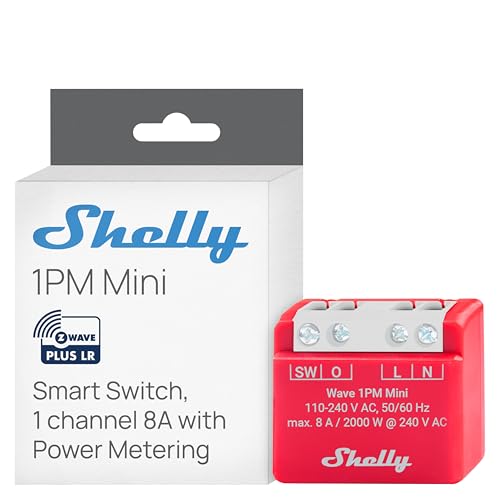
The Shelly Wave 1PM Mini Smart Switch Relay stands out as the ideal choice for homeowners seeking a compact and efficient solution for smart home automation. Its small size fits perfectly in tight spaces, making it easy to install in existing switch boxes. With support for real-time energy monitoring, you can track power usage of your appliances and reduce energy waste. Plus, you can control devices remotely, ensuring your coffee’s ready when you wake up. It even automates pool lighting, enhancing your outdoor ambiance. With Shelly’s reliable support and a 3-year warranty, you’ll enjoy peace of mind in your smart home setup.
Best For: Homeowners looking for a compact and efficient solution for smart home automation in tight spaces.
Pros:
- Supports real-time energy monitoring, helping users track and reduce energy consumption.
- Remote control capabilities allow for convenient automation of low-power appliances and outdoor lighting.
- Compact design makes it easy to install in existing switch boxes, enhancing versatility.
Cons:
- Requires a compatible Z-Wave gateway for configuration, which may add to setup complexity.
- Limited to low-power appliances, potentially excluding high-power devices from automation.
- Connectivity range may vary based on home layout and obstacles, affecting reliability in larger spaces.
Home Assistant Connect ZWA-2 for Z-Wave Devices

Home Assistant Connect ZWA-2 stands out as the best choice for anyone looking to seamlessly integrate Z-Wave devices into their Home Assistant system. This hub supports all Z-Wave devices with the latest 800-series chipset, ensuring reliable connections with minimal interference. Its long-range compatibility enhances battery life and connects distant devices effortlessly. Installation is a breeze with plug-and-play setup and easy migration from other adapters. Users rave about its performance, boasting a perfect 5.0-star rating for its reliability and responsiveness. With Nabu Casa’s support, you’ll enjoy a hassle-free smart home experience that truly enhances your setup.
Best For: Anyone seeking a reliable and easy-to-install hub to integrate Z-Wave devices into their Home Assistant system.
Pros:
- Supports all Z-Wave devices with the latest 800-series chipset for enhanced compatibility.
- Effortless plug-and-play setup allows for quick installation and seamless migration from other adapters.
- Outstanding user satisfaction with a perfect 5.0-star rating indicating high reliability and responsiveness.
Cons:
- Limited device availability in Europe for Z-Wave Long Range compatibility.
- Requires Home Assistant system for operation, which may not suit all users.
- Weight and dimensions may not be ideal for those looking for a more compact solution.
Hubitat Elevation Home Automation Hub (Model C-8 Pro)
Product not found or API error.
Looking for a versatile hub that seamlessly integrates with over 1000 smart home devices? The Hubitat Elevation Home Automation Hub (Model C-8 Pro) is your answer. Compatible with Alexa, Apple HomeKit, Google Home, Z-Wave, and Zigbee, it processes data locally for faster, more reliable control. With powerful antennas and built-in chips, it enhances signal strength, perfect for larger homes. Create detailed automation rules without relying on the cloud, ensuring privacy and control. Plus, you’ll find community support to help you navigate setup challenges. Whether you’re a beginner or an advanced user, Hubitat elevates your smart home experience effortlessly.
Best For: Those looking for a robust home automation solution that offers extensive compatibility with a wide range of smart devices and prioritizes privacy through local data processing.
Pros:
- Supports over 1000 smart home devices across multiple brands and protocols.
- Local data processing enhances speed, reliability, and privacy, functioning independently of cloud services.
- Offers advanced automation capabilities and customizable dashboards for user-friendly control.
Cons:
- Initial setup may be complex and require some technical knowledge.
- Some users have reported connectivity issues and delays in customer support response.
- Advanced features may have a steeper learning curve for beginners.
Zooz 800 Series Z-Wave Long Range S2 USB Stick (ZST39 LR)

For advanced users seeking a reliable solution for DIY smart home setups, the Zooz 800 Series Z-Wave Long Range S2 USB Stick (ZST39 LR) stands out with its exceptional long-range capability, extending network coverage up to 1 mile. Weighing just 0.704 ounces and measuring 2.2 x 0.8 x 0.2 inches, this sleek black USB stick is perfect for integrating with Home Assistant or HomeSeer. With compatibility for Z-Wave Plus and OTA firmware updates, it guarantees stable performance even in crowded areas. Just remember, it’s designed for users with programming skills, so be prepared to plunge into some technical setup!
Best For: Advanced users looking for a dependable and long-range Z-Wave solution for their DIY smart home setups.
Pros:
- Exceptional long-range capability, extending network coverage up to 1 mile.
- Compatible with Z-Wave Plus and supports OTA firmware updates for reliable performance.
- User-friendly installation with plug-and-play functionality, particularly with Home Assistant.
Cons:
- Targeted towards advanced users, requiring programming and Z-Wave expertise.
- Potential risk of bricking if using NVM backups from older Z-Wave sticks.
- Indoor use only, limiting installation options.
Z-Stick 10 Pro – Zigbee 3.0 & Z-Wave USB Adapter

The Z-Stick 10 Pro stands out as an ideal choice for smart home enthusiasts seeking a versatile and powerful solution for their automation needs. This Zigbee 3.0 and Z-Wave USB adapter boasts a dual radio design, ensuring compatibility with over 8000 devices across various ecosystems. With a wireless range of up to 1 mile, you’ll enjoy reliable performance without the cloud’s dependency. Installation is a breeze, especially with Home Assistant, and users praise its seamless integration. For best results, consider using a USB extension to minimize interference. This compact device is a fantastic addition to any smart home setup.
Best For: Smart home enthusiasts looking for a reliable and versatile solution for their automation needs.
Pros:
- Dual radio design supports both Zigbee 3.0 and Z-Wave, ensuring compatibility with a wide range of devices.
- Easy installation with seamless integration into platforms like Home Assistant and Raspberry Pi.
- Long wireless range of up to 1 mile enhances reliability and device response times.
Cons:
- May require a USB extension to minimize potential radio interference.
- Limited to users who are familiar with smart home technology and setup processes.
- Compact size might make it easy to misplace or overlook among other USB devices.
Hubitat Elevation Home Automation Hub (Model C-8)

Designed for users who prioritize speed and privacy in home automation, the Hubitat Elevation Home Automation Hub (Model C-8) stands out with its local processing capabilities. This hub supports a wide array of devices, including Zigbee, Z-Wave, and Matter, ensuring compatibility with over 1,000 smart devices. You can automate lights, locks, and thermostats easily, thanks to built-in apps that require no programming skills. The free mobile app allows remote control, while user feedback highlights its fast, reliable performance. Although some users experience a learning curve, Hubitat’s continuous updates enhance functionality and overall user experience.
Best For: Users who prioritize speed, privacy, and compatibility with a wide range of smart devices in their home automation system.
Pros:
- Local processing provides fast and reliable performance without dependence on the internet.
- Compatible with over 1,000 smart devices from various brands, enhancing versatility in home automation.
- User-friendly mobile app allows for easy remote control and monitoring of devices.
Cons:
- Some users report a learning curve when navigating the system and programming automations.
- Occasional stability issues with Z-Wave connections, leading to the need for hard reboots.
- Users have noted bugs in the programming editor that can affect automation setup.
Factors to Consider When Choosing Zwave Hubs
When you’re choosing a Z-Wave hub, consider how well it works with your existing devices and its range in your home. You’ll also want to look at its local processing capabilities and the automation features it offers. Finally, the user interface design can greatly impact your experience, so make sure it’s intuitive and easy to navigate.
Compatibility With Devices
Choosing a Z-Wave hub isn’t just about picking the latest model; it’s crucial to guarantee compatibility with a variety of devices to create a seamless smart home ecosystem. Make sure your hub supports the latest 800-series Z-Wave devices for peak functionality and device support. Additionally, check if it can handle multiple communication protocols like Zigbee and Matter, enhancing compatibility with various smart home gadgets. Hubs that connect with certified Z-Wave gateways will further expand your options. You’ll also want a hub that can manage a significant number of devices—look for those supporting over 4,000 units for future scalability. Finally, review user feedback and specifications to confirm reliable connectivity and performance with your chosen devices.
Range and Coverage
Compatibility with devices is just the start; range and coverage are also key factors in ensuring your Z-Wave hub meets your smart home needs. Z-Wave Long Range technology can extend your network coverage up to 1 mile, making it ideal for larger homes or properties. If you opt for the Z-Wave 800 series, expect improved range capabilities of up to 2,500 feet in mesh configurations, enhancing connectivity among devices. Remember, factors like wall materials and obstructions can impact signal strength, so placing your hub effectively is essential. High-quality antennas can boost signal strength, facilitating connections with distant devices. Plus, many hubs support scalable networks, connecting up to 4,000 devices, perfect for all-encompassing smart home setups.
Local Processing Capabilities
Local processing capabilities play an essential role in the effectiveness of your Z-Wave hub, as they enhance the speed and reliability of automation. By executing commands locally, you reduce latency and guarantee quicker device responses without relying on cloud services. This means your smart home continues to function even during internet outages, giving you peace of mind.
Additionally, local processing boosts your privacy since your data doesn’t have to be sent to external servers. You’ll also find that many advanced hubs offer detailed automation rules and scenes that can be created locally, allowing for greater customization. Plus, devices connected to these hubs often enjoy improved battery life due to reduced communication overhead, making your smart home even more efficient.
Automation Features Available
When considering a Z-Wave hub, automation features play a significant role in maximizing your smart home’s potential. You’ll appreciate hubs that enable you to create detailed automation rules and scenes, allowing for conditional triggers and scheduling that don’t rely on external services. Many hubs integrate seamlessly with a variety of smart devices and ecosystems, helping you automate lights, locks, sensors, and appliances from different brands effortlessly. Look for local processing capabilities, as these enhance the speed and reliability of your automation commands. Some hubs even come with built-in automation apps tailored for various skill levels, from simple tasks to complex routines. Advanced features like energy monitoring and occupancy-based actions can further boost your home’s efficiency and security.
User Interface Design
As you explore Z-Wave hubs, the user interface design becomes an essential factor in your decision-making process. Look for intuitive navigation that lets you manage your connected devices easily, even without technical expertise. Customizable dashboards can enhance your experience, allowing you to create layouts that suit your preferences and highlight frequently used functions. Pay attention to clear visual indicators, like device status lights, which help you quickly identify your devices’ operational states. Extensive help sections or tutorials integrated within the interface can support you in troubleshooting and optimizing your setup. Finally, a responsive design that adapts to smartphones and tablets guarantees you can manage your Z-Wave network seamlessly, no matter the device you use.
Installation and Setup Ease
A smooth user interface can only take you so far if the installation and setup of your Z-Wave hub are complicated. You should consider whether the hub offers a plug-and-play setup or requires more intricate configurations that demand technical knowledge. Extensive documentation and community support are essential; they’ll guide you through installation and troubleshooting. An intuitive, user-friendly interface makes device management a breeze, even if you lack programming skills. Look for hubs that seamlessly integrate with a variety of Z-Wave devices to simplify setup and minimize compatibility issues. Finally, assess how easily you can apply firmware updates, as this impacts your hub’s longevity and performance after installation. Choose wisely for a hassle-free experience!
Security Protocols Supported
Choosing a Z-Wave hub requires careful consideration of the security protocols it supports since robust security features are essential for protecting your smart home. Look for hubs that support the S2 security framework, which enhances encryption and authentication for device communication. This framework offers two security levels: one for basic devices and a higher level for those requiring stronger protection. Z-Wave’s security features reduce the risks of unauthorized access and eavesdropping, making them ideal for home automation. Additionally, some hubs provide Over-The-Air (OTA) firmware updates, allowing you to receive security patches remotely. Remember, the implementation of these protocols can vary by manufacturer, so verify which specific protocols each hub supports before making your choice.
Technical Support Options
When selecting a Z-Wave hub, you can’t overlook the importance of technical support options. Thorough documentation guides you through setup, device management, and troubleshooting, making it easier to navigate your system. Additionally, community forums and online resources like YouTube tutorials enhance your Z-Wave experience, offering valuable insights from fellow users.
Look for hubs that provide email and chat assistance, along with dedicated customer service lines for immediate help. Regular firmware updates are also vital, as they fix bugs and improve functionality, ensuring your devices remain reliable. Finally, pay attention to user feedback, as it often highlights the availability of internal resources and community engagement, which are essential for effective technical support.


