

When you’re exploring the best robotic arms of 2025, consider options like the Yahboom Robot Arm Kit 6DOF for Raspberry Pi5 and the Yahboom Jetson Nano Collaborative Robot, which offers impressive flexibility. The Hydrobot Arm Kit engages younger builders with a fun hydraulic system. All these innovations enhance functionality and creativity for various tasks. Plus, unique features can elevate your projects. Keep on browsing to discover even more top selections and their standout capabilities!
Yahboom Robot Arm Kit 6DOF for Raspberry Pi5
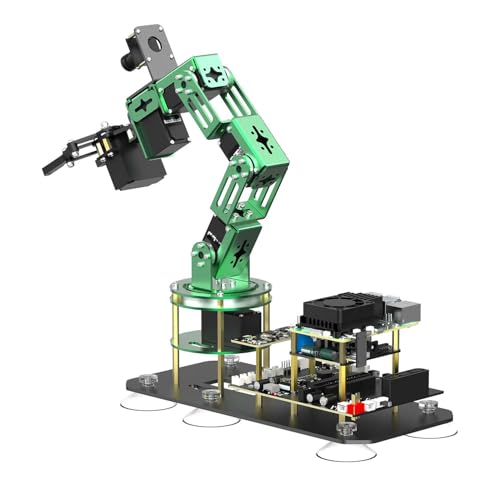
If you’re a tech enthusiast or educator looking to immerse yourself in robotics, the Yahboom Robot Arm Kit 6DOF for Raspberry Pi5 is an excellent choice. This compact kit, measuring 10.7 x 5.3 x 18.6 inches and weighing 4.4 pounds, offers impressive AI capabilities, including color recognition and gesture tracking. You can control it through various methods, from a mobile app to Jupyter Lab programming. Although assembly is straightforward, some users reported challenges with documentation and camera quality. Still, the robust build and extensive programming options make it a valuable tool for learning and experimentation in robotics.
Best For: Tech enthusiasts and educators seeking a hands-on experience in robotics and programming.
Pros:
- Versatile Control: Multiple control methods including mobile app, USB gamepad, and online programming enhance user experience.
- AI Capabilities: Advanced features such as color recognition, gesture tracking, and obstacle avoidance provide engaging learning opportunities.
- Robust Build Quality: Made from anodized aluminum alloy and equipped with high-precision servos, ensuring durability and reliability.
Cons:
- Documentation Issues: Users have reported inaccuracies and outdated information in the setup documentation.
- Complexity for Beginners: Requires prior programming knowledge, which may be challenging for newcomers to robotics.
- Camera Quality: Some users expressed dissatisfaction with the camera quality, impacting the overall functionality of the kit.
Robotic Arm Kit 6DOF Programming Robot Arm
Product not found or API error.
The Robotic Arm Kit 6DOF Programming Robot Arm stands out as an excellent choice for students and robotics enthusiasts aged 14 and up, thanks to its six degrees of freedom (6DOF) and high-quality digital servos. Weighing just 4.2 pounds, this arm’s exquisite metal bracket and anti-stall protection enhance durability. You can control it via PC, app, or wireless handle, making programming straightforward with Raspberry Pi and Arduino compatibility. Users appreciate the smooth operation and powerful servos, although some assembly challenges may arise. Overall, it’s a fantastic tool for education and exploration in robotics, earning a solid 4.1-star rating from users.
Best For: The Robotic Arm Kit 6DOF Programming Robot Arm is best for students, engineers, and robotics enthusiasts aged 14 and up.
Pros:
- High-quality digital servos provide smooth operation and powerful performance.
- Versatile control methods including PC, app, and wireless handle for ease of programming.
- Durable construction with anti-stall protection and clear assembly instructions.
Cons:
- Some users reported minor assembly challenges, particularly with screw lengths and servo connections.
- A few users experienced performance issues with servos after extended use.
- Upgrades may be necessary for enhanced durability in demanding applications.
Yahboom Jetson Orin NX Robotic Arm with Depth Camera

Designed for tech enthusiasts and aspiring roboticists, the Yahboom Jetson Orin NX Robotic Arm with Depth Camera stands out with its advanced 3D depth processing capabilities. Featuring three ROS master controllers, including the powerful Orin NX Super, this arm excels in AI vision and mechanical control. Its integrated 3D depth camera allows you to measure distances and identify objects, making it perfect for tasks like sorting and grasping. With support for multiple control methods, including a user-friendly app and keyboard input, this robust arm not only enhances your learning but also accelerates your AI project development.
Best For: Tech enthusiasts and aspiring roboticists looking to enhance their skills in AI vision and robotic control.
Pros:
- Advanced 3D depth processing capabilities allow for precise object identification and manipulation.
- Multiple control options including a user-friendly app, wireless handle, and keyboard input enhance user flexibility.
- Rich educational resources including tutorials and open-source code facilitate learning and project development.
Cons:
- Recommended age of 20 years and up may limit accessibility for younger learners.
- Best Sellers Rank indicates it may not be widely recognized in the market, potentially affecting resale value.
- Assembly required which might be challenging for some users without prior experience in robotics.
Yahboom Jetson Nano Collaborative Robot Arm (7Dof)
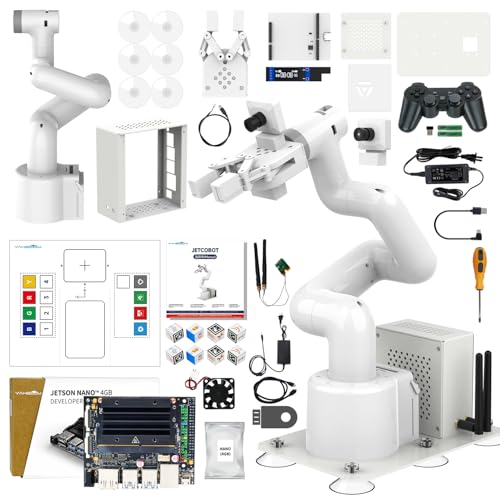
Engineered for mechanical engineers and tech enthusiasts, the Yahboom Jetson Nano Collaborative Robot Arm (7Dof) stands out with its impressive 7 degrees of freedom, offering unparalleled flexibility in programming and operation. Weighing just 10.43 pounds, it integrates seamlessly with the Jetson Nano ecosystem and supports multiple programming languages. Achieve millimeter-level precision in your projects, thanks to its advanced AI control features. The adaptive gripper allows for easy manipulation of objects, while the compact design guarantees safe collaboration in desktop environments. With extensive tutorials and support, you’ll find it an excellent addition to your robotics toolkit.
Best For: The Yahboom Jetson Nano Collaborative Robot Arm is best for mechanical engineers and tech enthusiasts who have a basic understanding of programming and are looking to explore advanced robotics.
Pros:
- Versatile Programming: Supports multiple programming languages and integrates with the Jetson Nano ecosystem for extensive development options.
- High Precision: Achieves millimeter-level positioning thanks to AI control, making it suitable for intricate projects.
- Collaboration Ready: Compact design allows for safe operation alongside humans, ideal for desktop environments.
Cons:
- User Experience Requirement: Recommended for individuals with some programming knowledge, which may deter complete beginners.
- Limited Gripper Control: The multi-function app does not control the gripper, potentially limiting usability in some applications.
- Mixed Customer Feedback: With a rating of 2.8 out of 5 stars, some users may experience dissatisfaction based on their expectations.
Teach Tech Hydrobot Arm Kit – STEM Building Toy for Kids 12

For kids aged 12 and up, the Teach Tech Hydrobot Arm Kit stands out as an engaging introduction to robotics and engineering. This hydraulic kit lets you build a real, working robot powered solely by water—no batteries needed! With six axes, it rotates 270 degrees and lifts up to 50 grams. The gripper can open to 47mm and even swap for suction components. As you assemble it, you’ll develop problem-solving skills and analytical thinking through STEM activities. Rated 4.5 stars, it does require patience, so adult supervision might help. Immerse yourself in this hands-on experience and explore the world of mechanics!
Best For: The Teach Tech Hydrobot Arm Kit is best for kids aged 12 and up who are interested in robotics, engineering, and STEM activities.
Pros:
- Engages children in hands-on learning about mechanical engineering principles.
- Powered by water, making it eco-friendly with no batteries required.
- Clear, animated instructions simplify the assembly process.
Cons:
- Assembly can be complex, requiring patience and attention to detail.
- May need adult supervision for younger or novice builders.
- Some users find the kit challenging, which might discourage beginners.
Thames & Kosmos Mega Cyborg Hand STEM Experiment Kit

The Thames & Kosmos Mega Cyborg Hand STEM Experiment Kit stands out as an exceptional choice for young aspiring engineers aged seven and up. You’ll build a wearable mechanical hand that uses hydraulic power, allowing you to simulate human movements effortlessly. With over 200 pieces, this kit lets you create various configurations, whether a right hand, left hand, or claw-like design. The hands-on experience teaches you about hydraulics and robotics, all while engaging your problem-solving skills. Despite some assembly challenges, the clear guide and adjustable fingers make it a fun project. Just be sure to supervise younger builders for best results.
Best For: Young aspiring engineers aged seven and up who enjoy building and exploring mechanical concepts.
Pros:
- Engages hands-on learning about hydraulics, pneumatics, and robotics.
- Offers adjustable configurations for different hand sizes and designs.
- High customer satisfaction with a 4.5 out of 5-star rating from over 3,196 reviews.
Cons:
- Assembly can be challenging, requiring patience and potentially adult supervision.
- Some customers reported issues with damaged packaging and missing parts.
- Instructions may need careful attention, as they can be unclear for some users.
Hiwonder xArm1S 6DOF Robotic Arm for Arduino Coding
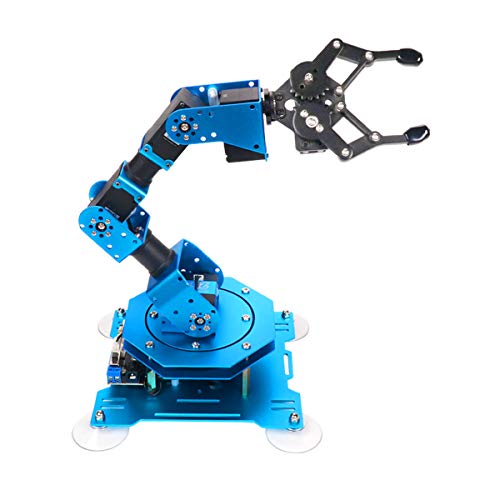
If you’re looking for an engaging way to immerse yourself in robotics and coding, the Hiwonder xArm1S 6DOF Robotic Arm is an excellent choice. This compact, aluminum alloy arm features six high-precision servos, allowing you to grasp objects up to 500g with ease. You can control it via a PC, app, or wireless controller, making programming simple. Assembly is quick, though sorting screws helps. While users enjoy its performance, some note jerky movements at full extension. Designed for ages 14 and up, this robotic arm offers a fantastic opportunity to explore coding and robotics in an interactive way.
Best For: The Hiwonder xArm1S 6DOF Robotic Arm is best for older children and adults who are interested in hands-on robotics and coding.
Pros:
- Versatile control options: Can be operated through a PC, app, mouse, or wireless controller for user convenience.
- Strong payload capacity: Capable of grasping objects weighing up to 500g, making it suitable for a variety of tasks.
- Easy assembly: Components are well-organized, and the assembly process is quick, especially with video guidance.
Cons:
- Jerky movements: Some users experience jerky motions when the arm is fully extended, affecting smooth operation.
- Documentation clarity: Mixed reviews on the instructional materials, with some users finding the setup and software installation details lacking.
- Age recommendation: Not suitable for very young children due to potential risks of damage or misuse.
Factors to Consider When Choosing Robot Arms
When choosing a robot arm, you’ll want to take into account several key factors. Think about age appropriateness, programming capabilities, and control methods available to guarantee it meets your needs. Don’t overlook assembly complexity and payload capacity, as these will impact how effectively you can use the arm.
Age Appropriateness
How do you guarantee that a robotic arm is suitable for the intended user? First, check the age recommendations, which typically range from 7 years and up. For younger users, look for kits designed for ages 12 and up, focusing on educational value and simpler assembly. These often come with clear instructions that foster hands-on engagement. If you’re considering advanced models, they usually target older teens and adults, often requiring programming knowledge and integration with systems like ROS. It’s important to match the complexity of the robotic arm to the user’s age and experience level. Younger builders benefit from thorough guides, while older users can tackle more sophisticated components and programming challenges with confidence.
Programming Capability
As you explore the programming capabilities of robotic arms, you’ll find that they can vary considerably, impacting your choice. Some arms support multiple programming languages like Python and integrate with development tools such as ROS and OpenCV, which can be essential for advanced projects. You’ll appreciate options for graphical programming that simplify coding, making it accessible for beginners while allowing experienced users to create custom actions. Pay attention to the quality of documentation and tutorials; clear instructions can streamline your learning process. Additionally, consider robotic arms with built-in software for action editing and real-time programming adjustments, as these features can greatly speed up your development and prototyping efforts. Choose wisely to match your specific needs and skill level.
Control Methods Available
Choosing the right control method for your robotic arm can greatly enhance your user experience and overall functionality. You’ll find various options available, such as mobile apps, PC interfaces, and physical remote controllers. Each method caters to different preferences and skill levels, so pick one that suits you best. Advanced models often support multiple control options, including USB gamepads and graphical programming interfaces, boosting versatility. Wireless connectivity is common, allowing you to operate the arm remotely without cumbersome cables. Additionally, some kits are compatible with popular programming environments like ROS and Python, opening doors for more complex projects. Keep in mind factors like ease of use, programming complexity, and hardware compatibility when making your choice.
Assembly Complexity
When selecting a robotic arm, considering assembly complexity can make a significant difference in your experience. Some kits come with pre-assembled components, making setup easier, while others require extensive assembly and technical know-how. You’ll want to look for clear, detailed instructions, including videos and tutorials, which can enhance accessibility, especially for beginners. Kits with well-machined parts and minimal defects generally offer smoother assembly experiences, reducing frustration. Remember, the age recommendation often reflects complexity; kits aimed at older users typically involve more intricate assembly and programming challenges. Many users face difficulties due to unclear documentation or complicated setups, so prioritizing instructional quality is essential when choosing the right robotic arm kit for your needs.
Payload Capacity
Understanding payload capacity is essential for selecting the right robotic arm, especially since it determines how much weight the arm can safely lift and manipulate. A higher payload capacity, like 500 grams or more, allows the arm to handle a broader range of objects, increasing its versatility for tasks such as assembly and material handling. You’ll notice that robotic arms specify this capacity in both static load and dynamic load terms, which can impact performance and safety. When choosing a robotic arm, consider the weight of the items you’ll move alongside the arm’s stability. Exceeding the rated payload might lead to mechanical failure or diminished precision, so prioritize designs and materials that support higher payloads while maintaining accuracy during operation.
Material Quality
Material quality plays an essential role in the performance and longevity of robotic arms, as it directly influences their durability and effectiveness. When choosing a robotic arm, consider materials like aluminum alloy and industrial-grade plastics, which offer stability and strength. High-quality metal brackets and components enhance wear resistance, ensuring a longer lifespan in various environments. The material choice also affects the arm’s weight, impacting its payload capacity and movement precision. Opt for well-machined parts free from burrs or defects to promote smooth assembly and reduce the risk of mechanical failures. Additionally, using high-torque servos alongside robust materials allows for greater payload capacities, enabling the robotic arm to effectively grasp and manipulate heavier objects.
Educational Value
Choosing the right robotic arm goes beyond just material quality; it also involves considering its educational value. Look for models that incorporate programming and engineering principles, as these can enhance your problem-solving and analytical skills in STEM fields. Many educational robot arms come with detailed assembly instructions and tutorials, making it easier for you to engage with robotics concepts at various complexity levels. Advanced features like AI capabilities and sensor technology let you explore real-world applications, deepening your understanding of automation. Remember, the complexity of educational robot arms varies, so assess your skill level before making a choice. Finally, consider options that encourage teamwork, as collaborative projects can greatly enrich your learning experience.
Technical Support Access
When you’re diving into the world of robotic arms, having reliable technical support is crucial, especially if you run into challenges during assembly or programming. Access to thorough documentation, including step-by-step guides and video tutorials, can make setup much smoother. Look for online support options like forums or live chat, which offer real-time assistance and quick solutions to your issues. Additionally, a wealth of course materials and programming resources can help you enhance your skills and maximize the robot arm’s capabilities. Finally, a responsive customer service team greatly boosts your experience by promptly addressing inquiries and resolving any challenges you face. Prioritizing these aspects will guarantee you’re well-supported throughout your robotic journey.


