

In 2025, you’ll find the best logic analyzers ready to enhance your debugging experience. Models like the LA1010 offer 16 channels at 100MHz, while the DSLogic U3Pro32 boasts an impressive 1GHz sampling rate with 32 channels. Compact designs like the Logic Analyzer 8 Channels USB Kit and affordable options like the HiLetgo cater to various needs. For robust performance and usability, consider these features carefully. Stay tuned to discover which analyzer suits your projects best!
LA1010 USB Logic Analyzer with 16 Input Channels

The LA1010 USB Logic Analyzer with 16 input channels is an excellent choice for hobbyists and technicians working on small to medium projects in embedded systems and digital circuit testing. With a 100MHz sampling rate, it captures 16 digital signals simultaneously, converting them into clear waveforms for analysis. You’ll appreciate its portable design and user-friendly KingstVIS software, compatible with Windows, macOS, and Linux. While it excels at testing digital circuits, be mindful of input impedance affecting weaker signals. Overall, it’s a highly rated tool that provides great value, making it ideal for developing, debugging, and long-term signal monitoring.
Best For: Hobbyists and technicians working on small to medium projects in embedded systems and digital circuit testing.
Pros:
- User-friendly KingstVIS software compatible with multiple operating systems.
- High sampling rate of 100MHz, allowing for effective capturing of digital signals.
- Portable design and included accessories enhance usability for on-the-go projects.
Cons:
- Input impedance may affect the performance of weaker signals.
- Some users report signal glitches at higher speeds.
- Known bug with Vth setting loss after PC sleep requires a manual reset.
Logic Analyzer 8 Channels USB Kit for Arduino and ESP32

For hobbyists and professionals diving into embedded systems or IoT projects, the Logic Analyzer 8 Channels USB Kit for Arduino and ESP32 stands out with its 24MHz speed and eight-channel capability. This compact kit, weighing just 6.1 ounces, makes it easy to capture fast digital signals. With user-friendly design elements, like a breakout board and flexible connection options, you’ll find it simple to integrate into your projects. It supports Windows, Mac, and Linux, enhancing its versatility. While some users mention installation challenges, many appreciate the kit’s portability and functionality for circuit analysis. Overall, it’s a solid choice for anyone in the field.
Best For: The Logic Analyzer 8 Channels USB Kit is best for hobbyists, students, and professionals working on embedded systems and IoT projects.
Pros:
- User-friendly design with a breakout board for easy connections.
- Compact and portable, making it convenient for on-the-go use.
- Broad compatibility with Windows, Mac, and Linux operating systems.
Cons:
- Inadequate documentation and installation challenges reported by users.
- Short USB cables may limit connection flexibility.
- Some design flaws in connectors and storage case have been noted.
HiLetgo USB Logic Analyzer Device (24MHz 8 Channel)
Product not found or API error.
With its 24 MHz sampling rate and eight channels, the HiLetgo USB Logic Analyzer is an ideal choice for hobbyists and DIY enthusiasts looking to troubleshoot and analyze signals in their projects. It covers a wide range of sampling options, making it versatile for various applications like UART and SPI. While it’s powered via USB and comes with necessary cables, remember it lacks an onboard capture buffer. You’ll need to install the WinUSB driver and use compatible software, like Sigrok. Although it’s inexpensive, be cautious with voltage limits to avoid damaging the device.
Best For: The HiLetgo USB Logic Analyzer is best for hobbyists and DIY enthusiasts looking to troubleshoot and analyze signals in their electronic projects.
Pros:
- Inexpensive and cost-effective for home hobbyists.
- Versatile with multiple sampling options suitable for various communication protocols.
- Works well with free, open-source software like Sigrok/PulseView.
Cons:
- No onboard capture buffer, which may limit performance in certain scenarios.
- Lacks probes, requiring additional jumper wires or clips for connections.
- Limited input protection, necessitating caution with voltage limits to avoid damage.
LA1010 USB Logic Analyzer 16 Input Channels 100MHz
Looking for a reliable logic analyzer that delivers great performance without breaking the bank? The LA1010 USB Logic Analyzer features 16 input channels with a 100MHz sampling rate, perfect for debugging embedded systems and testing digital circuits. Its portable design, paired with KingstVIS software, guarantees smooth operation across Windows, macOS, and Linux. While it captures signals effectively, some users note occasional glitches at high speeds. With an intuitive GUI and support for over 30 protocols, it’s an excellent choice for technicians and hobbyists alike. Plus, you’ll appreciate its value compared to pricier models.
Best For: Technicians and hobbyists seeking an affordable yet effective tool for debugging embedded systems and testing digital circuits.
Pros:
- Supports over 30 protocols, making it versatile for various digital applications.
- User-friendly GUI and compatible with multiple operating systems (Windows, macOS, Linux).
- Highly rated for value, offering solid performance for mid-speed digital circuits.
Cons:
- Some users experience signal glitches at high speeds, particularly above 50MHz.
- Known issues with Vth setting loss after PC sleep require a manual reset.
- Limited input impedance may affect performance with weaker signals.
Logic Analyzer 8 Channels USB Kit for Arduino and ESP32
The Logic Analyzer 8 Channels USB Kit is an ideal choice for hobbyists and professionals alike, especially those working with Arduino and ESP32 projects. With its 24MHz speed and eight channels, it captures fast digital signals effortlessly. The user-friendly design includes a base module and breakout board for easy connections, while the detailed kit features test clips and USB cables. Compatible with Windows, Mac, and Linux, this portable kit is perfect for embedded systems and IoT applications. Despite some installation challenges and limited documentation, users appreciate its functionality and portability, making it a valuable addition to your toolkit.
Best For: This product is best for hobbyists, students, and professionals involved in Arduino and ESP32 projects, as well as those working in embedded systems and IoT applications.
Pros:
- User-friendly design with easy connections to breadboards and microcontrollers.
- Compact and portable storage case for better organization and accessibility.
- Compatible with multiple operating systems and software, enhancing versatility.
Cons:
- Limited documentation and installation challenges can hinder user experience.
- Some users report issues with short USB cables and connector design flaws.
- Mixed reviews on functionality, with significant issues reported by certain users.
USB Logic Analyzer, 16 Channels (DSLogic Plus)
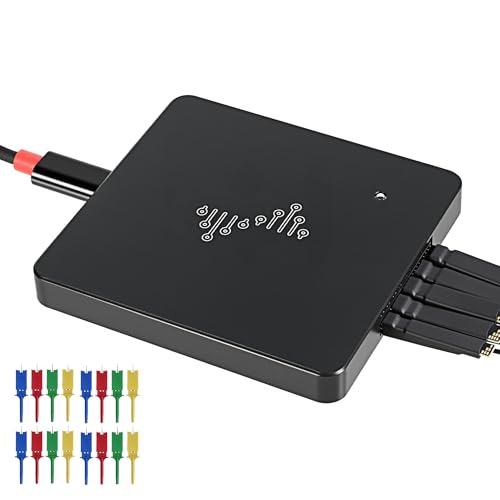
For engineers and hobbyists working on complex electronic projects, the DSLogic Plus USB Logic Analyzer stands out with its impressive 16-channel capability and high sampling rates. You’ll appreciate the USB 2.0 Type-C interface, allowing for quick data transmission at 480bps. With a sampling rate of up to 100MHz across all channels, it captures detailed signals effectively. The analyzer supports various operating systems and features DSView software, which includes nearly 100 protocol decoders. Its compact design and included accessories, like test hooks and shielded wires, enhance usability. User feedback highlights its effectiveness for projects like 6502 microcontroller and FPGA development.
Best For: Engineers and hobbyists looking for a versatile and high-performance logic analyzer for complex electronic projects.
Pros:
- Compact design with a USB 2.0 Type-C interface for quick data transmission.
- High sampling rates up to 100MHz for detailed signal capture across all 16 channels.
- Supports multiple operating systems and features extensive protocol decoding through DSView software.
Cons:
- Some users report a need for software improvements for enhanced functionality.
- Limited maximum sampling depth in buffer mode compared to some competitors.
- The minimum sampling pulse width of 5ns may not meet the needs of all high-speed applications.
DSLogic U3Pro32 USB Logic Analyzer

Engineered for electronics enthusiasts and professionals alike, the DSLogic U3Pro32 USB Logic Analyzer stands out with its impressive 1GHz sampling rate and 32 digital channels. With 2Gbits of on-board DDR3 memory, it supports various modes to meet your needs. You’ll appreciate the straightforward software, DSView, compatible with Windows, macOS, and Linux, featuring nearly a hundred protocol decoders. Users rave about its reliability and effective signal decoding, while adjustable voltage thresholds enhance compatibility. The sturdy aluminum case and high-quality probe wires guarantee durability, making this analyzer a valuable tool for your embedded electronics projects and debugging tasks.
Best For: Electronics enthusiasts and professionals seeking a reliable and high-performance logic analyzer for testing and debugging.
Pros:
- High sampling rate of 1GHz allows for accurate data capture across 32 digital channels.
- User-friendly software (DSView) supports multiple operating systems and offers extensive protocol decoding capabilities.
- Sturdy construction with an aluminum case and high-quality probe wires ensures durability and improved waveform quality.
Cons:
- Probe wires can be challenging to connect to breadboards, potentially complicating setups.
- Light mode display may be overly bright for some users, making the dark mode preferable.
- Learning curve for UI may require adaptation, especially for using time measuring cursors effectively.
Factors to Consider When Choosing Logic Analyzers
When you’re choosing a logic analyzer, consider factors like channel count and sampling rate to match your project’s needs. You’ll also want to check for protocol compatibility and software integration options to guarantee a smooth experience. Finally, make sure the input voltage range aligns with your testing environment.
Channel Count Importance
Choosing the right channel count for a logic analyzer is essential for effective circuit analysis. The channel count determines how many digital signals you can capture simultaneously, which is vital when dealing with complex circuits. If you opt for higher channel counts, like 16 or more, you can monitor multiple buses and protocols at once, making it invaluable for embedded systems and digital debugging. Each channel corresponds to a digital signal line, offering you greater flexibility and reducing the need for sequential measurements. Using a logic analyzer with too few channels might cause you to miss critical interactions, leading to incomplete data and troubleshooting challenges. Always consider your circuit’s complexity and the specific protocols when selecting the ideal channel count.
Sampling Rate Considerations
The sampling rate of a logic analyzer is essential for capturing and analyzing digital signals accurately. It determines how many samples per second the analyzer can collect, impacting your ability to analyze faster signals and intricate timing relationships. Typically, mid-range models offer around 100 MHz, suitable for signals up to 50 MHz, while higher-end devices can reach 1 GHz. A faster sampling rate means you can measure shorter pulse widths more precisely. Additionally, consider the analyzer’s operating modes, like buffer and stream modes, as they can influence effective sampling rates and data depth. Always align the sampling rate with your specific application needs, including maximum signal frequency and desired timing resolution, to guarantee peak performance.
Protocol Compatibility Needs
Selecting a logic analyzer that aligns with your protocol compatibility needs is vital for effective debugging and analysis. Different analyzers support various protocols like I2C, SPI, UART, and CAN. You should pick one that meets your specific requirements. For example, the LA1010 supports over 30 protocols, making it versatile for diverse tasks. Pay attention to the sampling rate and channel count, as some protocols need higher speeds and more channels for accurate analysis, especially in complex systems. Additionally, check software compatibility with protocol decoders, as limitations may arise with certain tools. Finally, review user feedback on protocol decoding effectiveness, since some models excel in specific protocols while struggling with others. This guarantees you make an informed choice.
Software Integration Options
Understanding protocol compatibility leads naturally to contemplating software integration options, which can greatly impact your experience with a logic analyzer. Compatibility with software applications, whether open-source like Sigrok or proprietary options like KingstVIS and DSView, enhances usability. However, some analyzers may pose installation challenges or require extra driver configurations, affecting your initial setup time. The effectiveness of protocol decoders also varies; some software supports nearly 100 protocols, easing complex signal analysis. User feedback emphasizes the need for intuitive graphical user interfaces (GUIs) for smooth navigation and functionality. Regular updates and community support can help fix bugs and improve compatibility with newer operating systems, ultimately boosting performance and your overall satisfaction. Choose wisely to maximize your debugging potential!
Input Voltage Range
When choosing a logic analyzer, input voltage range plays a critical role in ensuring compatibility with the digital circuits you’ll be working with. A typical range spans from negative to positive values, like -0.5V to 5.25V, allowing for flexibility across various devices. Make sure the analyzer accurately recognizes digital states, needing voltages above 2.0V for high and below 0.8V for low signals. A wider input voltage range means you can work with both traditional TTL and modern CMOS technologies. Keep in mind the input impedance, usually around 1MΩ, which can affect signal capture. Finally, never exceed the maximum input voltage to prevent permanent damage to your analyzer, ensuring it remains a reliable tool in your debugging arsenal.
Portability and Design
After considering input voltage range, the next aspect to weigh is portability and design. The weight and dimensions of a logic analyzer greatly impact how easily you can transport and use it in various settings. Opt for lighter, more compact models that enhance mobility. A user-friendly design, complete with a breakout board and easy connection options, simplifies setup in different environments. Look for a storage case, as it helps keep your analyzer organized and protected during transport, making it ideal for fieldwork. USB connectivity allows for straightforward connections to laptops and PCs without bulky power supplies. Finally, verify the build quality is robust; durable components and connectors are essential for reliable performance during mobile use.
User Interface Quality
A high-quality user interface is essential for effectively utilizing a logic analyzer, as it directly influences your experience in maneuvering and interpreting digital signals. A user-friendly graphical user interface (GUI) enhances your overall experience, allowing you to easily navigate through captured signals and settings. Look for high-quality interfaces that feature programmable threshold voltage settings and intuitive toolbars for protocol analysis, which streamline your debugging process. Clear visual representations of digital waveforms make it easier to interpret complex data. Additionally, consider the quality of documentation; well-written user guides and troubleshooting resources provide vital support. Finally, compatibility with various software platforms, including open-source options, allows you to choose interfaces that best fit your preferences and technical needs.
Price vs. Performance
Choosing the right logic analyzer involves balancing price and performance to meet your specific needs. Start by considering the sampling rate and number of channels; higher rates (100MHz or more) and additional channels deliver better performance for complex signal analysis. If you’re working with simpler applications, lower rates (like 24MHz) might suffice. Remember, the cost often reflects the capabilities—higher-priced models may boast advanced features like extensive protocol support. User feedback can guide you in finding models that offer robust functionality for mid-speed circuits at a reasonable price. Don’t overlook thorough software support and ease of use, as these factors can greatly enhance the overall value of your investment, ensuring you get the best performance for your budget.


