

If you’re on the hunt for the best E-Ink displays of 2025, you’ve got some fantastic options. The Waveshare 7.5inch and 13.3inch displays suit Raspberry Pi projects, while the E-Ink Display HAT V4 is perfect for Jetson Nano. If you need a compact option, the 2.13inch HAT is energy-efficient. For a larger, colorful experience, check out the Bigme B251. Each one offers unique features tailored to your needs, so keep exploring to discover what suits you best.
Waveshare 7.5inch E-Ink Display for Raspberry Pi

If you’re looking for a versatile display that suits low-power applications, the Waveshare 7.5inch E-Ink Display for Raspberry Pi is an excellent choice. With a resolution of 800×480, it provides clear visuals without a backlight, retaining content even when powered off. Weighing just 1.44 ounces, it’s lightweight and easy to integrate. Its ultra-low power consumption means it only uses energy while updating the display, making it perfect for projects like shelf labels or industrial instruments. Keep in mind, though, that you’ll need an additional driver board, and programming may require some time to master.
Best For: Those seeking an energy-efficient display for low-power applications like shelf labels and industrial instruments.
Pros:
- Ultra low power consumption, retaining content without power.
- Wide viewing angle and clear display in various lighting conditions.
- Lightweight design makes it easy to integrate into various projects.
Cons:
- Requires an additional driver board, which is not included.
- Steep learning curve for programming and display buffer management.
- Vulnerability concerns regarding the ribbon cable.
E-Ink Display HAT V4 Module for Raspberry Pi and Jetson Nano
Product not found or API error.
The E-Ink Display HAT V4 Module is an excellent choice for developers and hobbyists working with Raspberry Pi and Jetson Nano platforms. This compact 2.13-inch display features a resolution of 250×122 pixels, delivering sharp black and white visuals. It communicates via SPI and supports partial refresh, making it perfect for low-power applications. Weighing just 1.06 ounces, it’s easy to integrate, though you may encounter a learning curve during setup. With an average rating of 4.5 stars, users praise its clarity and energy efficiency. Just remember to consult the available online resources for a smoother installation process.
Best For: Developers and hobbyists looking for a compact, low-power display solution for Raspberry Pi and Jetson Nano projects.
Pros:
- High resolution (250×122 pixels) provides clear black and white visuals.
- Ultra-low power consumption allows for battery-powered applications without frequent recharging.
- Easy integration with popular platforms like Raspberry Pi and Jetson Nano.
Cons:
- Setup may require a learning curve due to driver installation and programming.
- Documentation may be challenging for some users, leading to potential initial frustrations.
- Not a plug-and-play solution, requiring careful configuration to work effectively.
Waveshare 13.3inch E Ink Spectra 6 Full Color E-Paper Display

Designed for hobbyists and developers, the Waveshare 13.3-inch E Ink Spectra 6 Full Color E-Paper Display offers a vibrant and energy-efficient solution for your projects. With a resolution of 1600×1200, this display utilizes Spectra 6 technology for stunning color saturation and high contrast. It connects easily via SPI to various controllers, including Raspberry Pi, Arduino, and ESP32, thanks to its onboard voltage translator. You’ll appreciate its ultra-low power consumption, retaining the last displayed content when powered off. Lightweight at 1.3 pounds, it’s perfect for innovative applications. Plus, it’s backed by Amazon’s return policy for peace of mind.
Best For: Hobbyists and developers looking for an energy-efficient and vibrant display for their projects.
Pros:
- High resolution of 1600×1200 for clear and detailed visuals.
- Ultra-low power consumption, retaining display content without needing power.
- Easy connectivity with various controllers via SPI, including Raspberry Pi and Arduino.
Cons:
- Limited to the resolution and color capabilities of E Ink technology.
- May require additional programming knowledge for setup and integration.
- Slightly heavier compared to typical LCD displays, which may affect portability.
Waveshare 2.13inch E-Ink Display HAT for Raspberry Pi

For hobbyists and professionals alike, the Waveshare 2.13inch E-Ink Display HAT is a standout choice for anyone using Raspberry Pi. With a resolution of 250×122, this compact display excels in low-power applications, only consuming energy during refreshes. Its wide viewing angle and ability to retain content without power make it perfect for projects like shelf labels or portable devices. Compatible with various Raspberry Pi models, the HAT’s SPI interface guarantees easy integration. Plus, it’s well-rated by users for its simplicity and versatility, though some may wish for backlighting options. Enjoy crisp reading and innovative projects with this impressive display!
Best For: Hobbyists and professionals seeking a low-power, versatile display solution for Raspberry Pi projects.
Pros:
- Ultra low power consumption, only drawing power during refreshes, making it ideal for battery-operated applications.
- Wide viewing angle and ability to retain the last displayed content without power, enhancing usability in various settings.
- Easy integration with multiple Raspberry Pi models and other boards through its SPI interface.
Cons:
- No backlight option, which may limit visibility in low-light conditions.
- Resolution may be low for applications requiring high-definition graphics or detailed images.
- Limited refresh speed, which may not be suitable for dynamic content changes.
Bigme B251-Worlds 1st E Ink Color Monitor with 25.3 inch eink Screen

Introducing the Bigme B251, the world’s first E Ink color monitor, perfect for anyone seeking a comfortable viewing experience. With a generous 25.3-inch screen and a resolution of 3200 x 1800 pixels, this monitor uses innovative E Ink technology to mimic color printing paper, reducing eye strain. Its xRapid refresh technology guarantees smooth changes, while adjustable front lighting caters to various environments. You’ll appreciate the intelligent voice control for hands-free operation and multiple connectivity options, including HDMI and USB. However, keep in mind that some users report lower contrast and brightness issues, ideal for sensitive eyes but not for video enthusiasts.
Best For: Individuals with eye sensitivity seeking a comfortable, low-strain viewing experience.
Pros:
- E Ink technology reduces eye strain and mimics color printing paper, enhancing comfort.
- xRapid refresh technology ensures smooth transitions without ghosting.
- Multiple connectivity options, including HDMI and USB, allow for versatile device compatibility.
Cons:
- Lower contrast and brightness compared to traditional LCD/LED monitors.
- Video quality is inferior, making it less suitable for video enthusiasts.
- Some users report issues with dead pixels and customer service dissatisfaction.
7.5inch E-Ink Display HAT for Raspberry Pi and Jetson Nano

The 7.5-inch E-Ink Display HAT is perfect for hobbyists and developers using Raspberry Pi or Jetson Nano who crave a low-power, high-visibility solution for their projects. With an 800×480 resolution and ultra-low power consumption, it refreshes at only 38mW. You’ll love the no-backlight feature, which retains displayed content without power. The standard GPIO header guarantees easy integration, and the onboard voltage translator makes it compatible with multiple microcontrollers. Plus, you’ll appreciate the thorough user manual and online resources to aid your development. Users rate it 4.4 out of 5, highlighting its ease of use and effective support.
Best For: Hobbyists and developers looking for a low-power, high-visibility display solution for Raspberry Pi or Jetson Nano projects.
Pros:
- Ultra-low power consumption, refreshing at only 38mW.
- Retains displayed content without power due to the no-backlight feature.
- Easy integration with standard GPIO header and onboard voltage translator.
Cons:
- Some reports of long-term degradation in display quality.
- Refresh time of 5 seconds may not be suitable for dynamic content.
- Limited color display (black and white two-color).
Waveshare 7.5inch E-Ink Display HAT for Raspberry Pi
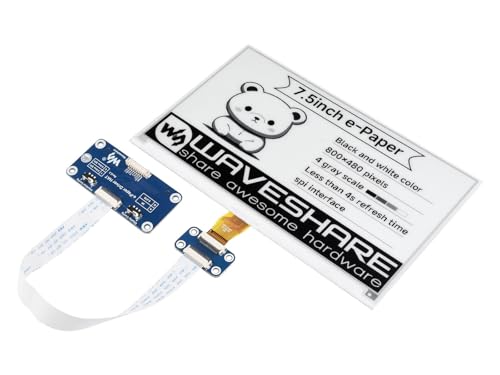
Designed for tech enthusiasts and developers, the Waveshare 7.5inch E-Ink Display HAT for Raspberry Pi stands out with its ultra-low power consumption and impressive compatibility across multiple Raspberry Pi models. With a resolution of 800×480, it offers a clear display visible from wide angles. You’ll appreciate how it retains the last content displayed even when powered down, making it perfect for shelf labels and industrial instruments. Thanks to its SPI interface and onboard voltage translator, it connects seamlessly with various controllers, including Jetson Nano and Arduino. Be sure to check the online manual for helpful usage examples before you start!
Best For: Tech enthusiasts and developers looking for a low-power display solution compatible with various Raspberry Pi models.
Pros:
- Ultra low power consumption, making it energy efficient.
- Wide viewing angle for clear visibility from different positions.
- Retains last content displayed even when powered off, ideal for static information.
Cons:
- Limited to a resolution of 800×480, which may not be suitable for detailed graphics.
- Requires familiarity with SPI communication for integration.
- May not be as bright or vibrant as traditional LCD displays due to the lack of backlight.
Factors to Consider When Choosing E Ink Displays
When you’re choosing an E Ink display, there are several key factors to keep in mind. You’ll want to take into account display size, resolution, and power consumption to guarantee it fits your needs. Additionally, check for interface compatibility and viewing angles to get the best experience possible.
Display Size Selection
Choosing the right display size for your E Ink project hinges on several factors, including the intended application and environment. E Ink displays range from compact 2.13 inches to larger 13.3 inches, allowing you to select based on your specific needs. If you’re aiming for visibility in public settings, larger displays like 7.5 inches or 13.3 inches are ideal, offering higher resolutions that enhance readability. Conversely, smaller displays work well for portable devices or simple graphics, though they typically come with lower resolutions. Additionally, consider the physical dimensions; larger models may require more installation space and affect device compatibility. Ultimately, your choice should align with your project’s functionality and user experience.
Resolution Requirements
Selecting the right display size is just the beginning; resolution requirements are equally important in ensuring your E Ink display meets your project’s needs. The resolution greatly impacts the clarity and detail of the content. For instance, higher resolutions deliver sharper images and text. Common resolutions range from 250×122 pixels for small screens to 1600×1200 pixels for larger displays. If you need to showcase detailed graphics or fine text, aim for at least 800×480 pixels to maintain readability and visual quality. Don’t forget about pixel density, which affects how crisp the display appears. Higher pixel densities provide better visual performance. Always consider your application; simpler displays may not need high resolutions, while complex graphics will.
Power Consumption
How much power do you need for your E Ink display? When considering E Ink technology, you’ll be pleased to know that these displays boast ultra-low power consumption. They primarily draw power only when updating the content, allowing many models to retain the last image without any power at all. In standby mode, some E Ink displays consume as little as 0.017mW, making them a smart choice for energy efficiency. Typically, update power usage hovers around 38mW, which is considerably less than traditional displays. This low power requirement is particularly beneficial for battery-operated devices, extending battery life and cutting operational costs. So, when you choose an E Ink display, you’re not just getting clarity but also remarkable energy efficiency.
Interface Compatibility
When considering an E Ink display, it’s crucial to guarantee compatibility with your existing hardware. Most E Ink displays use SPI (Serial Peripheral Interface) for communication, allowing for quick data transfer to your microcontroller. Check the voltage compatibility; many models operate at either 3.3V or 5V, so make sure you have the right interfacing to prevent damage. Some displays feature onboard voltage translators, making integration with both voltage levels easier. If you’re using a Raspberry Pi or similar, look for a standard GPIO header, as it simplifies connections and enhances interoperability. Finally, consider the partial refresh capabilities of the display, as this can affect how quickly you can update content based on your project’s requirements.
Viewing Angles
Compatibility with your hardware is just the start; viewing angles are another key factor to contemplate when choosing E Ink displays. E Ink technology often provides wide viewing angles exceeding 170°, ensuring clear visibility from various positions without color distortion. This feature is particularly useful in settings where multiple viewers gather, as the contrast and clarity remain intact even at wide angles. Plus, since E Ink displays lack a backlight, they maintain consistent quality in different lighting conditions. You’ll also appreciate how they minimize glare, making them ideal for reading outdoors in bright sunlight. With E Ink, you won’t need to worry about maintaining a direct line-of-sight, enhancing your overall reading experience.
Application Suitability
Choosing the right E Ink display for your project means considering various factors that influence its application suitability. First, think about power consumption; E Ink displays excel in low-power settings since they retain images without continuous power. This makes them perfect for battery-operated devices. Next, consider the viewing conditions—if your project involves outdoor signage, E Ink’s wide viewing angles will guarantee clarity in bright light. Resolution is also vital; align it with your content’s detail needs, from lower pixel counts for simple displays to higher resolutions for more intricate visuals. Finally, if your application involves static content, E Ink’s slower refresh rates are ideal, providing eye comfort for reading or detailed presentations without glare.


